February 25, 2025
Decrease Support Calls by 23% with Localized Troubleshooting Guides
Imagine this: You’ve just purchased a new piece of tech, but it’s not working as expected. You look up the troubleshooting guide, only to find unclear, poorly translated instructions. Frustrating, right? Instead of solving the issue yourself, you end up calling customer support.
This is exactly what happens when businesses fail to provide accurate, well-localized troubleshooting guides. Confusing translations can lead to more support tickets, frustrated customers, and higher operational costs. But what if you could reduce support calls by 23% simply by improving the clarity and localization of your troubleshooting documentation?
That’s where MachineTranslation.com comes in. With cutting-edge AI-powered translation and key term accuracy, this platform ensures that your troubleshooting steps are not just translated but clearly understood by customers in their native language.
The challenges of translating troubleshooting guides
Before we dive into how MachineTranslation.com solves these issues, let’s explore the biggest challenges businesses face when translating troubleshooting content.
1. Maintaining technical accuracy
Troubleshooting guides often include industry-specific terminology. Words like “firmware update” or “network latency” need to be precisely translated, or users may misinterpret instructions. Direct, one-to-one translation isn’t enough—technical accuracy and context must be considered.
2. Clarity and readability
A good troubleshooting guide should be concise and easy to follow. Overcomplicated language or poor translations can cause confusion. If users can’t understand the instructions, they’ll quickly give up and call support instead.
3. Consistency across different languages
For global businesses, troubleshooting guides need to be consistent across multiple languages. If one version says “reset your device,” and another says “turn off and restart,” customers in different regions may receive conflicting instructions.
4. Fast turnaround for frequent updates
Technology evolves, and so do troubleshooting guides. Businesses need fast, high-quality translations every time they update their products or user manuals. Waiting days or weeks for translations can slow down product launches and customer support efficiency.
How MachineTranslation.com enhances troubleshooting guide translation
Here’s how MachineTranslation.com empowers businesses to overcome these challenges with its powerful features. For a more interactive experience, check out the full report by clicking here: https://mymt.ai/trnutawcwc.
1. AI translation agent for customization
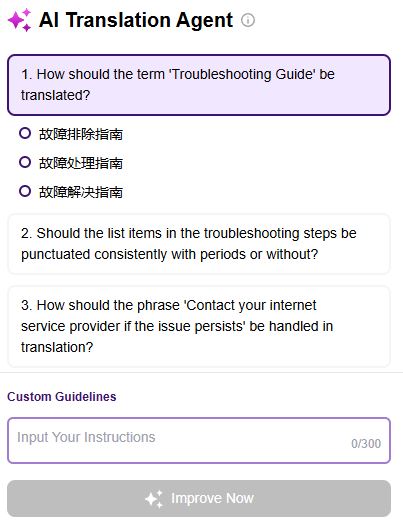
Unlike generic translation tools, MachineTranslation.com uses an AI Translation Agent that lets you customize translations.
It asks targeted questions about your source text to refine terminology and tone.
It learns from your past choices, ensuring translations stay consistent over time.
It allows users to set preferences for industry terms, brand tone, and formatting.
For example, if your company prefers “hard reset” instead of “factory reset,” the AI will remember this preference, improving translation accuracy every time.
2. Key term translations for technical accuracy
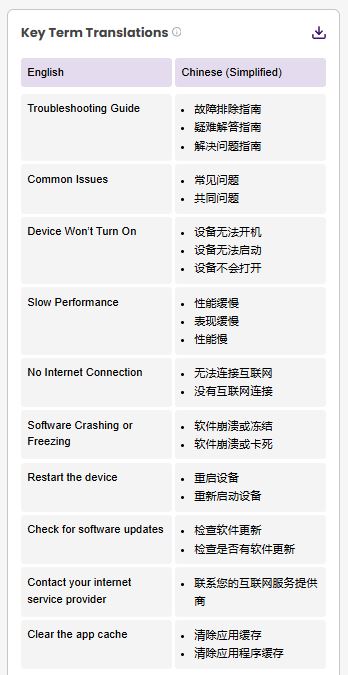
MachineTranslation.com’s Key Term Translations feature ensures that industry-specific terms are translated correctly and consistently.
Identifies up to 10 specialized terms in your text.
Aggregates the top three translation options from leading AI translation engines.
Displays them in a side-by-side comparison table, making it easy to choose the best one.
This feature is particularly useful for tech support content, where terminology precision is crucial to avoiding misunderstandings.
3. Segmented bilingual view for faster editing
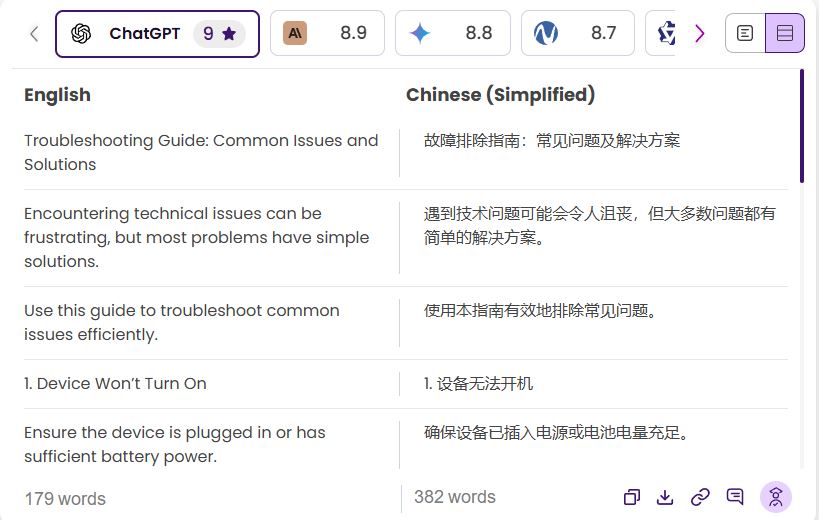
Reviewing a translated troubleshooting guide can be overwhelming, especially for lengthy documents. That’s why MachineTranslation.com introduced a Segmented Bilingual View, which:
Breaks down translations into segments for easy comparison.
Allows per-segment editing so changes don’t affect the entire document.
Highlights inconsistencies, making corrections quick and efficient.
This feature minimizes errors and speeds up the editing process, ensuring that translated guides are accurate and easy to follow.
4. Aggregation of multiple translation sources

Instead of relying on a single AI engine, MachineTranslation.com provides side-by-side comparisons from the best translation sources. This means:
You get multiple translation options for each segment.
AI-powered recommendations help you select the most accurate translation.
You can compare translation quality scores before finalizing your content.
This approach ensures that your troubleshooting guides are not just translated quickly but also with the highest possible accuracy.
5. Translation quality insights and scoring
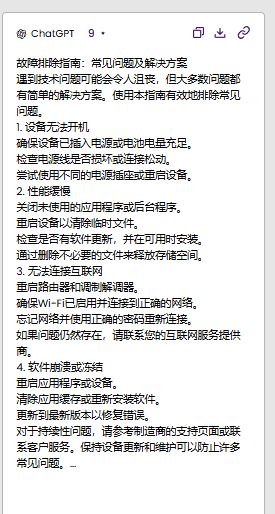
Not all machine translations are equal. That’s why MachineTranslation.com provides AI-generated quality scores to help you pick the best translation for your troubleshooting guides.
Each translation receives a score from 0 to 10.
AI highlights tone differences, terminology choices, and readability.
Ensures that support documentation is customer-friendly and technically accurate.
With these insights, you can confidently select the best translation for your audience, reducing the risk of misunderstandings.
Reducing support calls by 23%
A global electronics company struggled with a high volume of support tickets related to product troubleshooting. Many of these inquiries stemmed from unclear translated guides.
By switching to MachineTranslation.com, they:
Refined terminology with the AI Translation Agent.
Ensured consistent translations using Key Term Translations.
Sped up troubleshooting updates with Segmented Bilingual View.
The result? A 23% decrease in support calls within six months. Customers were able to resolve issues on their own, leading to higher satisfaction rates and lower support costs.
Best practices for localizing troubleshooting guides
To ensure your troubleshooting guides are effectively localized and provide clear solutions for users worldwide, consider these best practices:
Use AI-Enhanced Glossaries – Develop and maintain a glossary of key technical terms to ensure consistent, accurate translations across different languages.
Leverage AI + Human Review – Combine machine translation with expert human editing to refine translations, ensuring both speed and precision.
Monitor Translation Quality Scores – Use AI-powered translation quality assessment tools to select the most effective and user-friendly translations.
Enable Continuous Learning – Platforms like MachineTranslation.com learn from past translations, improving accuracy and reducing redundant edits over time.
Test Before Publishing – Conduct real-world testing by having native speakers or target users review translations before official release to prevent miscommunications.
Adapt to Cultural Context – Localization goes beyond translation—ensure troubleshooting steps align with cultural norms and technological expectations of each target audience.
Optimize for Readability – Keep instructions clear and concise, using bullet points, short sentences, and consistent terminology to make troubleshooting easy to follow.
By following these strategies, businesses can enhance self-service capabilities, reduce support costs, and improve customer satisfaction with localized troubleshooting guides.
Conclusion
Providing clear, accurate, and well-localized troubleshooting guides isn’t just about helping customers—it’s about improving operational efficiency. By using MachineTranslation.com, businesses can:
Reduce support calls and costs.
Improve customer satisfaction.
Speed up product documentation updates.
Ensure technical accuracy and consistency across multiple languages.
If you’re looking to enhance your troubleshooting guides and minimize customer inquiries, try our AI-powered translation platform today and experience the power of AI-driven translations!

By Clarriza Heruela
Clarriza Mae Heruela graduated from the University of the Philippines Mindanao with a Bachelor of Arts degree in English, majoring in Creative Writing. Her experience from growing up in a multilingually diverse household has influenced her career and writing style. She is still exploring her writing path and is always on the lookout for interesting topics that pique her interest.
Share:


