May 15, 2025
How Poorly Translated Outbound Emails Increase Support Ticket Volume
Support teams are built to solve problems—not repeat themselves. But when customers keep asking about things already covered in your emails, it’s often a sign that your message didn’t land the way you intended. Poorly translated outbound emails may seem like a small issue, but they can quietly flood your inbox with unnecessary tickets and frustrated replies.
You might be tracking call volume, software bugs, or staffing levels—but overlooking something as fundamental as translation quality. When translations miss the mark, even simple updates like shipping notices or password resets become confusing. In this article, you’ll learn how these miscommunications directly increase support ticket volume—and what you can do to prevent it.
The hidden cost of misunderstood outbound emails
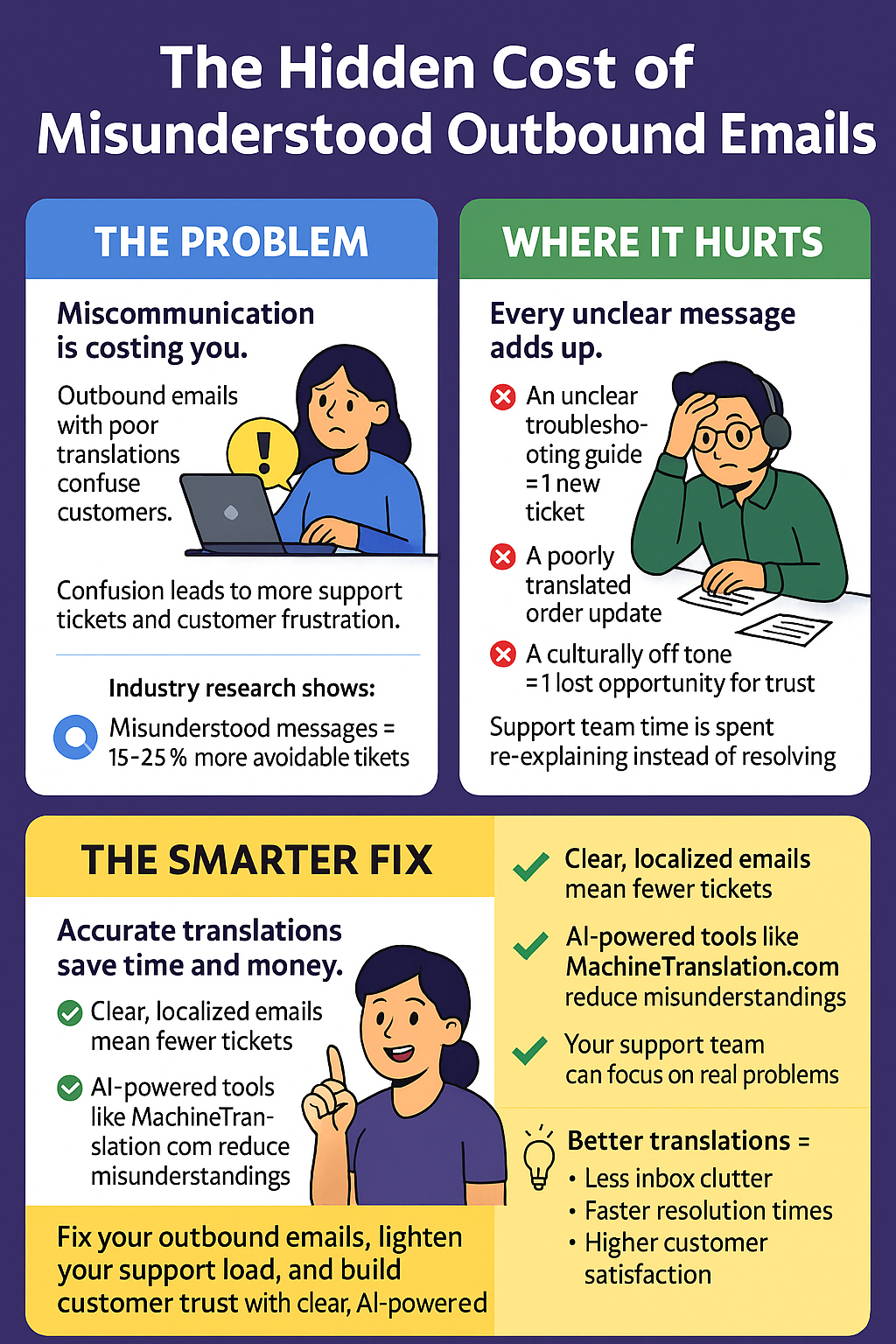
If you're noticing a rising number of support tickets, your outbound emails might be the culprit. Miscommunication due to poor translations in customer service often leads to confusion—and that confusion turns into questions. Questions that fill your inbox and overwhelm your support team.
According to industry research, misunderstood messages can lead to a 15–25% increase in avoidable support tickets. And each support ticket costs an average of $15–$25 to resolve. That adds up fast when a simple email translation could’ve prevented the issue altogether.
Every time an order update or troubleshooting guide is misinterpreted, a customer hits reply. That reply could’ve been avoided with accurate translations tailored to their language and context. Clear communication isn’t just about using the right words—it’s about getting the tone, clarity, and cultural fit just right.
You already know how valuable your support team's time is. If they’re spending hours explaining a message that should’ve been clear from the start, something’s broken. And it’s costing you—in time, money, and customer trust.
Accurate, AI-powered translations from platforms like MachineTranslation.com can reduce translation-related misunderstandings and significantly lighten the support load—so your team can focus on real issues, not re-explaining the basics.
Why poor email translations create more work for support teams
Multilingual customer support sounds great until things get lost in translation. When a professional translation isn’t used, small errors snowball into big problems. A poorly translated “shipment delayed” message can come off as “shipment lost,” causing unnecessary panic.
Imagine sending a step-by-step troubleshooting email to a customer in Spain. If one step is mistranslated, the customer might skip it or do the wrong thing, thinking it makes no sense. That’s a ticket waiting to happen.
This isn’t just about grammar—it's about trust. When your messages are unclear, customers doubt your ability to help. They start questioning every email, even if the rest is perfectly written.
Traditional translation tools often miss the mark
You might be using general tools like Google Translate or DeepL to save time. But these platforms aren’t designed to manage your customer support translation needs with consistency. They lack translation memory systems that remember how specific terms were used before.
Without learning from your past translations, these tools repeat the same issues over and over. You end up manually fixing the same terminology mistakes in every project. That’s inefficient and frustrating.
Another issue? Tone and brand voice are ignored. Your emails should sound like you—not like a robot. Traditional tools can’t adjust tone or follow custom instructions the way AI-powered translation agents can.
How MachineTranslation.com reduces support tickets
MachineTranslation.com changes the game by offering AI translation tools designed for business needs. It provides customized translations using advanced AI that refines your message for tone, terminology, and audience. This feature is essential when clarity and professionalism are non-negotiable.
One standout feature is the AI Translation Agent, which asks questions to understand the tone and style you're aiming for. Based on your responses, it delivers accurate translations that make your outbound emails clear and direct. It’s like having a smart editor who knows your brand and adapts in real time.
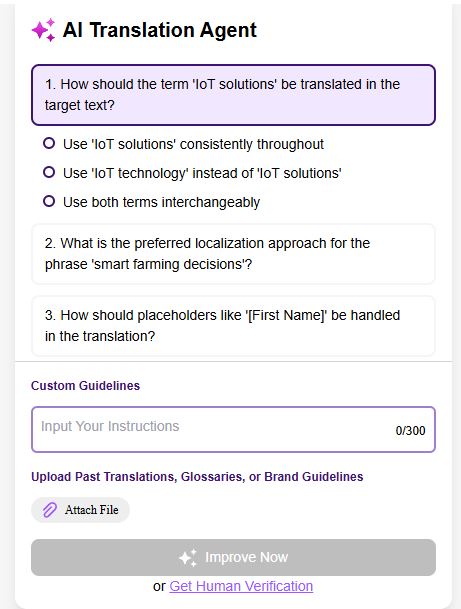
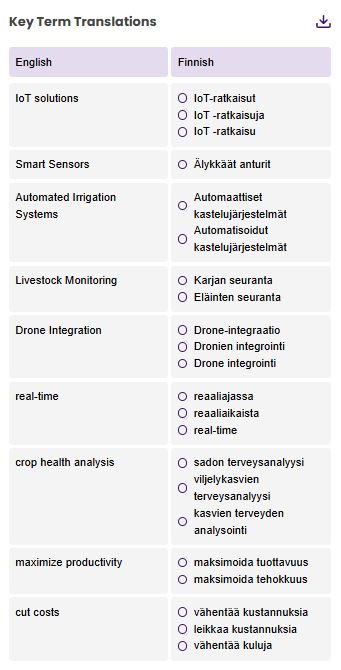
The platform also includes a key term glossary management tool, which ensures your technical terms and branded language stay consistent. Whether you're a SaaS company explaining “API rate limits” or a retailer describing “shipping windows,” you can lock in those terms for future use. That kind of consistency builds customer trust—and reduces replies asking for clarification.
Using accurate and professional translations to prevent miscommunication
If your emails include product steps, delivery timelines, or technical advice, clarity is everything. Professional translations ensure the message is not only in the right language but also in the right tone. Your customers need to feel like you’re speaking directly to them, not running content through a cold, generic machine.
The AI Translation Agent on MachineTranslation.com can simplify this by adjusting your tone for formal or informal markets. For instance, a support email in Japan might need a more formal tone than one sent to users in Brazil. These details matter more than you think when customers decide whether to trust what you say.
The tool also uses translation memory to learn from previous choices. Once you've corrected how your system explains “system reboot,” the platform remembers that for next time. That means fewer mistakes, faster translations, and a better experience for everyone involved.
How AI improves the quality of translated outbound messages
AI translation isn’t just faster—it’s smarter. The best AI-powered translation tools adapt with every new message you translate. They spot patterns in your content and learn what works best based on tone, format, and industry-specific terms.
This is especially powerful when you’re sending the same type of messages repeatedly—like shipping confirmations or password resets. With MachineTranslation.com, those repeated phrases are improved over time thanks to translation memory and smart suggestions. You won’t have to waste time fixing the same awkward phrases.
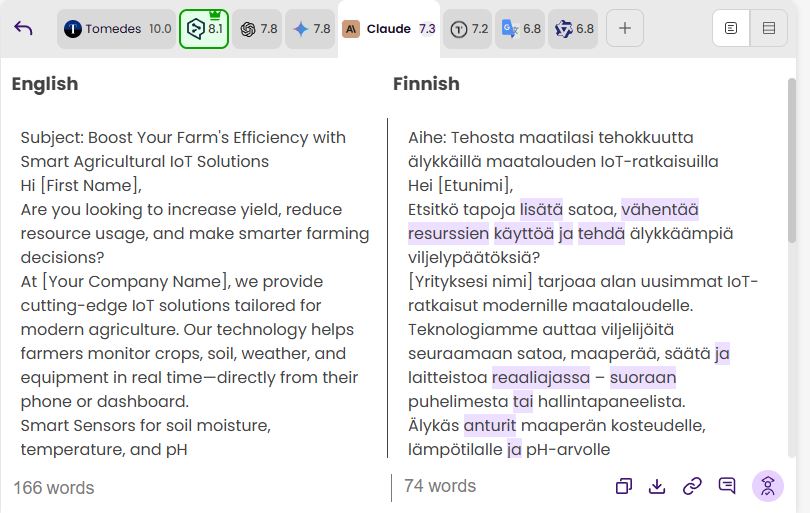
You also get translation quality insights that score each translation based on tone, term use, and fluency. That way, you don’t have to guess if something is accurate—you’ll know before sending. These scores help you choose between engine outputs and decide whether to send the email as-is or tweak it a little more.
Setting up a translation workflow for customer support emails
A smart workflow saves your team hours every week. Start by uploading your email template into MachineTranslation.com. The tool handles automatic language detection, so you don’t need to guess what language your customer used.
Next, you review the bilingual segmented view, where each sentence is shown side by side with its translation. If something looks off, just edit that segment. No need to rewrite the whole thing.
Add a glossary for your most-used terms like “account locked,” “monthly billing,” or “refund policy.” The system will automatically apply your choices every time. If you need to be 100% certain—like for legal messages—add Human Certification to have a professional linguist confirm it.
Benefits of using professional translation tools in customer support
Every part of your customer experience matters, especially support. By using accurate translations, you eliminate unnecessary back-and-forth and improve resolution times. Customers get answers the first time—no clarifications needed.
You also scale faster. If your company is growing into new markets, multilingual customer support is a must. Using a tool that supports over 270 languages means you can expand without hiring an army of native speakers.
Your brand voice stays consistent no matter the language. Whether you're playful or professional, MachineTranslation.com keeps your tone intact across every outbound message. That builds trust—and reduces tickets from confused users.
Conclusion
Outbound emails are the front line of customer support. When they’re misunderstood, you pay the price in tickets, time, and customer frustration. But with the right AI translation tools, you can avoid that entirely.
MachineTranslation.com offers everything you need for professional translations that actually sound human. From glossary tools to AI-assisted recommendations, it gives you control over tone, terminology, and accuracy.
The result? Fewer support tickets. More satisfied customers. And a support team that can finally breathe.
Unlock the power of fast, accurate translations with 100,000 words free every month at MachineTranslation.com. Whether you're working on documents, websites, or global communication, our AI-driven platform makes it easy and efficient. Subscribe today and start translating smarter—no credit card required!

By Clarriza Heruela
Clarriza Mae Heruela graduated from the University of the Philippines Mindanao with a Bachelor of Arts degree in English, majoring in Creative Writing. Her experience from growing up in a multilingually diverse household has influenced her career and writing style. She is still exploring her writing path and is always on the lookout for interesting topics that pique her interest.
Share:


