November 5, 2026
What people did with multi-language selection on MachineTranslation.com
Before MachineTranslation.com had a panel for adding target languages, people were already doing the job by hand. About 12 in every 100 translating sessions, on desktop and on phones alike, included a text translated into a second language.
I'm the CMO at Tomedes, the translation company that develops MachineTranslation.com. We looked at the new multi-language selection feature on MachineTranslation.com for the first 12 days, from 16 to 27 October, to see whether it matched something people already wanted.
It did. The language panel is now the main way people reach a second language on desktop. It has not yet changed how many second-language translations people do, and that is useful to know too.
Key takeaways
- People were already translating into a second language by hand before the panel existed, at about 12 in every 100 translating sessions on desktop and on phones, so the demand was there before we built for it.
- About one in seven desktop translating sessions (14%) used multi-language selection in its first 12 days, and 47% of the people who used it and translated in more than one session came back to it.
- Second-language translations stayed level at 12.3 per 100 desktop sessions after launch against 11.9 before, while 85% of them now go through the panel.
- 52% of the sessions that added a language used the panel to switch to a different one, and 95% of the texts translated afterward stayed in one language.
- Sessions that used the panel hold 28% of desktop translations from 14% of the sessions, so the heaviest translators adopted it first.
What happened when we added the panel
About one in seven desktop translating sessions (14%) used multi-language selection in its first 12 days. A plus sign beside the target language opens a panel where people can add up to two more languages, and each one appears as a tab. 47% of the people who used it and translated in more than one session came back to it.
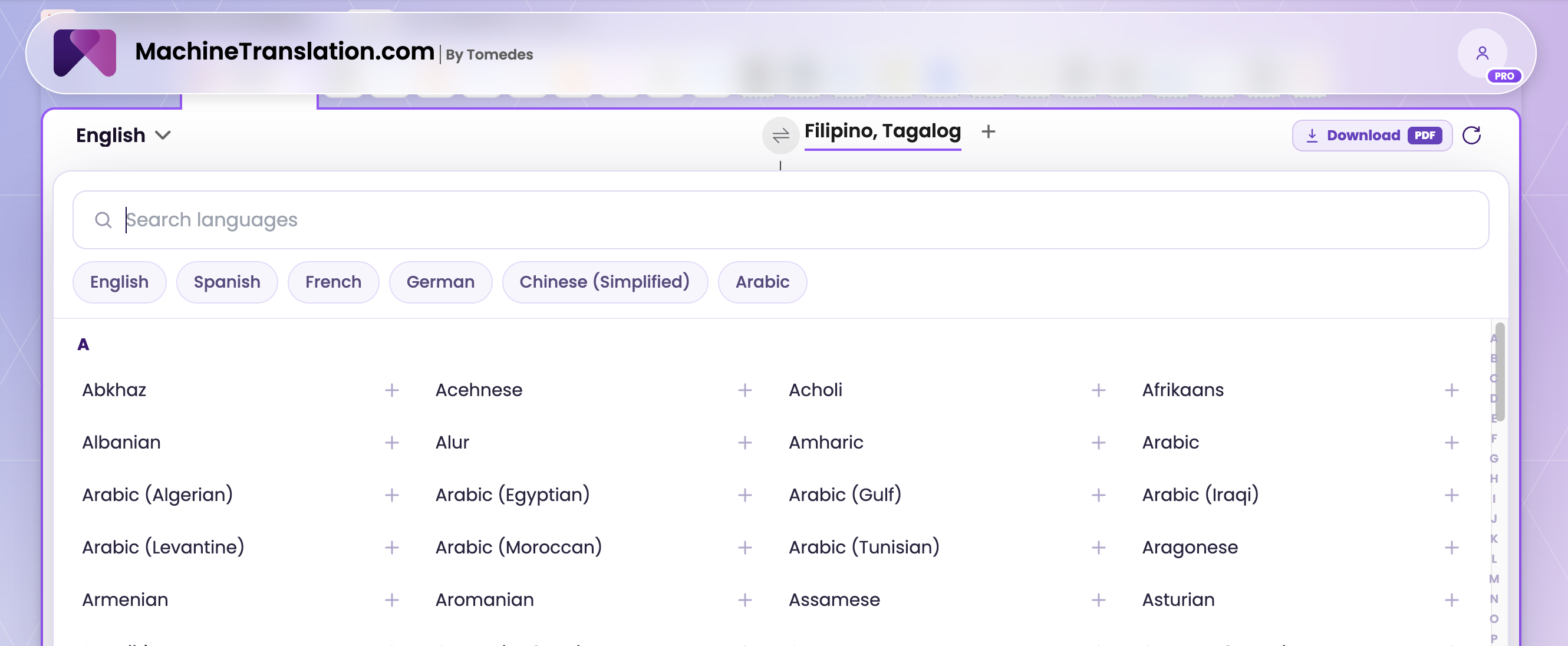
Trying a new feature is easy and usually comes from curiosity. Coming back to it says more, and nearly half of the people who had the chance to come back did. Use was highest on the homepage and among returning visitors, and lowest on language-pair pages, where the two languages are already set.
Why the demand was already there
The demand was already there, and that changes how risky a feature is. Before launch, about 12 in every 100 translating sessions on desktop included a second-language translation, and phones, which still have no panel, ran at the same level. Building for behavior you can already see is safer than building for behavior you hope to create.
Phones keep making the point. They have no multi-language selector, and people on phones still changed the target language by hand at about the same rate before and after the launch.
Second-language translations stayed level. They were 12.3 per 100 desktop sessions after launch against 11.9 before, a difference too small to count as real. What changed is the route, because 85% of desktop second-language translations now go through the panel. That is worth saying plainly, because clicks alone would have looked like a win. The panel gave an existing habit a front door. It has not yet made people translate into more languages, and I would rather report that than imply otherwise. For a business, the lesson is practical. A convenience feature earns its place by making a common job easier. Growth in volume is a separate question, and it needs its own test. 52% of the sessions that added a language used the panel to switch. They removed the language they started with and carried on in the new one. Another 33% kept both and moved between the tabs, and 12% kept both without switching. Here is how I read it. For about half of the people, adding a language was a faster way to pick the right one. The 95% figure points the same way. After people added a language, 95% of the texts they translated next stayed in one language. Only the tab on screen is translated, so people get one answer at a time, and most seem to want exactly that. The choice of languages tells a similar story. People added more than 100 different languages, from English and French to Kazakh and Kurdish. English was the language they added most, and Spanish was the one they most often moved away from. Our post on the demand for non-English language pairs in translation is the place to start for that wider picture. Sessions that used the panel hold 28% of desktop translations from 14% of the sessions. The heaviest translators found it first, and they are the people with the most to gain from a faster way to change language. For a business that translates every week into several markets, that is the group to watch. The same people translate a little more in sessions where they use the panel, so the panel adds something small on top of a habit that was already there. Most of the 28% reflects who they are. The numbers add up to a clear early read. People already wanted a faster way to reach a second language, they found the panel, and many came back to it. It has not yet changed how much people translate. The table puts each finding next to what I think it means. Treat this as a first picture of how people use the feature, taken early enough to be useful. We look at what people do after a launch and compare it with what they did before. That is how we know the demand was already there, and it is why we can say plainly that the number of second-language translations did not move. We compared the 12 days after launch with the two weeks before and with phones, which have no panel, and we left out our own team's sessions and automated traffic. Sharing the result, including the parts that did not move, is part of how we work. You get the same picture we use to decide what to build next. The first 12 days leave three questions open. Do the people who use the panel come back and pay more? Have the paying customers who translated one text into many languages by hand in September adopted it? Would translating every open tab change the 95% of texts that stay in one language? The first two questions need a few more weeks of data. You can try multi-language selection on desktop at MachineTranslation.com. It works on text one tab at a time. For whole documents, a different feature lets you translate multiple files into multiple languages in one session. On the MachineTranslation.com desktop translator, use the plus sign beside the target language to open the Add target languages panel. You can add up to two more languages, and each one appears as a tab. The tab on screen is the one that gets translated, so click a tab to see the text in that language. No, for text the desktop panel translates only the tab on screen, and another language is translated when you click its tab. For documents, one session can hold multiple files and multiple target languages, and every file and every language is processed in that single session. Choose the target language in the language picker, and the text already in the box is translated into it within a few seconds. On desktop you can also use the plus sign to add a language or swap the one you started with, which 52% of the sessions that added a language did. No. The plus sign and the language tabs appear only in the desktop layout. On phones you change the target language with the regular single-language picker, and people on phones do this at about the same rate as people on desktop did before the panel launched.Second-language translations stayed level, and what that tells us
What switching languages tells us about how people work
The people who translate the most adopted it first
What the numbers add up to
Each finding next to how I read it
What we saw How I read it 14% of desktop sessions used it in 12 days, and 47% of repeat visitors came back to it People found it, tried it, and many kept using it. About 12 in every 100 sessions already did this by hand before launch The demand was there before the panel. Second-language translations stayed level, and 85% now go through the panel The panel changed the route and not yet the amount. 52% of sessions that added a language used it to switch For many people, the job is reaching the right language quickly. 95% of texts after adding a language stayed in one language People tend to want one answer at a time. 14% of sessions hold 28% of the translations The heaviest translators noticed it first. Why we share numbers like this
What we are watching next
Frequently asked questions
1. How can I translate text into multiple languages at the same time?
2. Does MachineTranslation.com translate into all added languages at once?
3. How do I translate text into a different language?
4. Is multi-language selection available on phones?

By William Mamane
Connect on LinkedInWilliam leads marketing and growth at Tomedes, where he turns SEO experiments and real campaign data into the strategy behind MachineTranslation.com's reach. He writes about how AI products actually get found and trusted plus the tactics that work, the ones that don't, and what search is rewarding right now.
Share:


